Goldmines remember the good spots. Walkability shows what is around them.
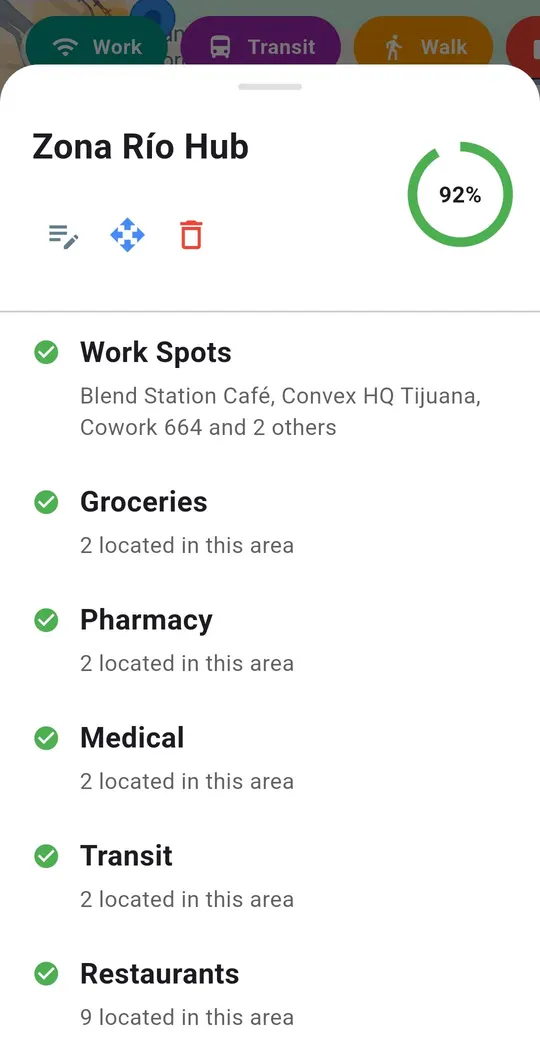
A Goldmine is a neighborhood or spot you want to remember. Press and hold on the map to save one, give it a name, and it appears on the map with a circle around it. Your saved Goldmines are kept in your account, and a Goldmine list shows all of them.
Use Search This Area to scan the part of the map you are looking at. The result is a walkability score for the area and a heat map of nearby places such as work spots, groceries, pharmacies, medical, transit and restaurants. It shows counts and a heat map, not place names or opening hours, so check a specific place before you rely on it.
Saving a new Goldmine and running Search This Area are premium. Goldmines you have already saved stay visible on the free plan. See what is free and what is premium.
Get BorderBudget on Google Play Get BorderBudget on the App StoreWhat is a Goldmine?
A Goldmine is a neighborhood or spot you save from the map and name, so you can find it again. It shows on the map with a circle around it and is kept in your account.
What does the walkability scan show?
A walkability score for the area and a heat map of nearby places such as work spots, groceries, pharmacies, medical, transit and restaurants.
Does it show place names or opening hours?
No. It shows counts and a heat map only, so check a specific place before you rely on it.
Which parts are premium?
Saving a new Goldmine and running Search This Area. Goldmines you already saved stay visible on the free plan.
Questions about BorderBudget? Reach us at developer@borderbudget.com, or check the full FAQ.