Save your trip details once. Open them from any phone or computer when you need them.
Lose your phone, drop it in water or watch the battery die, and you lose your contacts, your bookings and the address of where you're staying. Lifeline is a free feature in the BorderBudget app that lets you prepare for that before you travel. You build an emergency card, protect it with a share code and a PIN, and open it from any borrowed device when you need it.
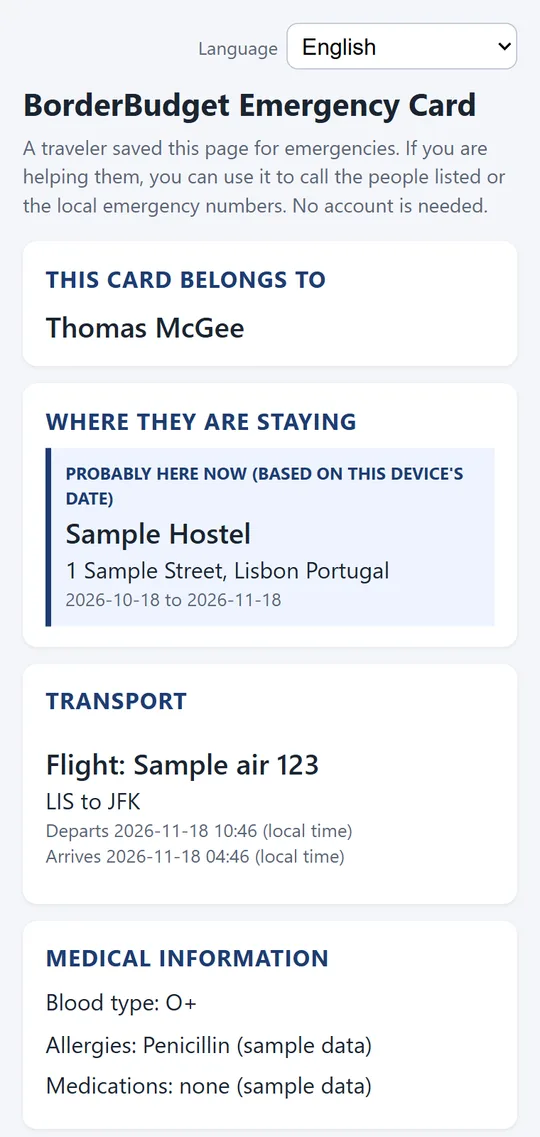
You choose what to add. The only required items are the country you're in, at least one place you're staying, and your PIN. Everything else is optional.
The card PIN opens the main card: your stay, transport, contacts, emergency numbers and the other details above. A second, private PIN protects the most sensitive items: booking references, your insurance policy number, your phone's IMEI, the email of your Apple or Google account, and a note on where your backup codes are kept. Someone helping you can use the card without ever seeing those.
On any phone or computer, open the card's web page, enter the share code and your PIN, and your card appears. A person helping you can follow the short "if you are helping on a borrowed device" steps shown on the card. The page is available in nine languages: English, Spanish, French, German, Italian, Portuguese, Thai, Indonesian and Turkish. What you typed yourself, such as allergies or notes, appears exactly as you wrote it and isn't translated.
For what to do in the first hour, see our checklist for a lost, stolen, wet or dead phone.
Lifeline is a convenience, not an emergency service. It can't contact help for you, recover or repair your phone, or replace calling local emergency services if you're in danger. It deliberately doesn't store passwords or two-factor backup codes. Emergency numbers can change, so confirm them locally. BorderBudget hasn't verified what card owners enter.
Get BorderBudget on Google Play Get BorderBudget on the App StoreIs Lifeline free?
Yes. Lifeline is free for everyone in the BorderBudget app, including the emergency card and the offline emergency screen.
Do I need the app or an account to open my card?
No. You need the app and an account to create the card, but you open it from any phone or computer browser with the share code and PIN. No app and no login are needed to open it.
What stops a stranger from guessing my PIN?
The PIN is checked on our server, and a card is temporarily locked after several wrong attempts, for longer each time. Booking references, policy numbers and your phone's IMEI also sit behind a separate private PIN.
Does Lifeline work without an internet connection?
The Emergency screen inside the app works offline and signed out, with your trusted contacts and local emergency numbers. The shareable card page is a web page, so it needs an internet connection to open.
Does Lifeline store my passwords or contact help for me?
No. Lifeline deliberately does not store passwords or two-factor backup codes, and it cannot contact help for you. It holds only the information you choose to add, so that you or someone helping you can find it from any device.
Questions about BorderBudget? Reach us at developer@borderbudget.com, or check the full FAQ.